Claude + Blender Is The Best Way To Make AI Videos (Full Course)
So this is everything from the video. Both workflows, every prompt I typed and every prompt I got back. Never opened Blender before? Start with the beginner one. Make something and come show me in the NextGenAI community 😊
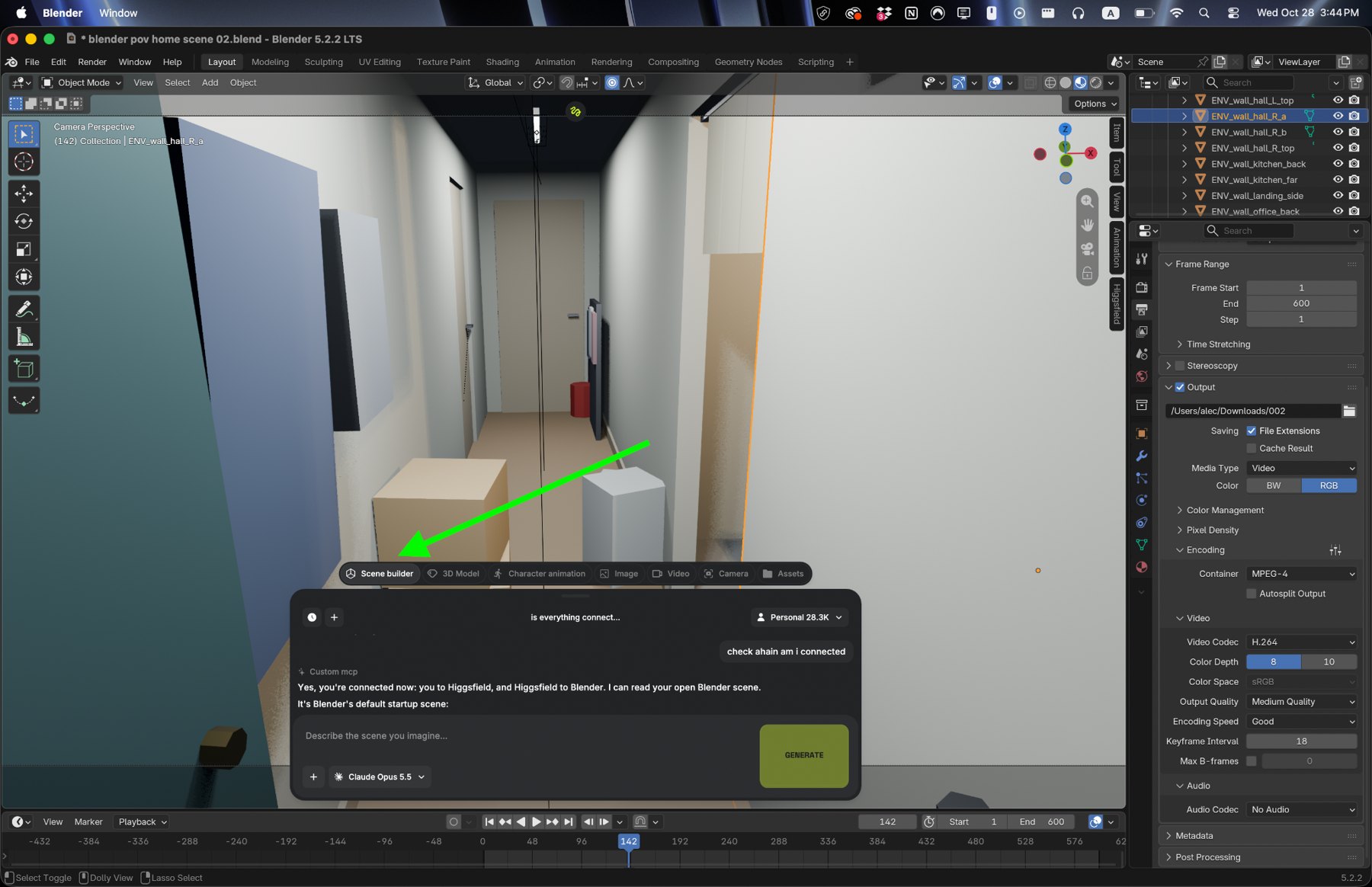
Open the Scene Builder chat. Free mode works, but for the best results pick Claude Opus 5.5
Describe what you want to see. Always say low poly, otherwise your PC might not handle it
Mine took around 5 to 10 minutes. It can look a bit glitchy, that's fine, it's just the reference
The scene
What I typed in Scene Builder
Make a first person POV scene of us returning home to our asian cramped low budget apartment, unlocking the door and pushing it open.

We enter the cramped hallway and our wife who appears into frame, complaining in Chinese before disappearing out of frame again, still complaining. We continue walking forward and turn to enter our room, pushing open the door and turning the light switch on.

The room is a small office room with our very messy desk and our gaming setup. We slump into our chair and pull the chair forward, getting ready to play some games. The camera movement has to be sluggish replicating our exhaustion and weariness. Create a low poly scene here in blender. The whole duration is 25 seconds.
Result
Making a change
Don't like something? Just tell Scene Builder what to change.
What I typed
The woman is carrying a crying baby, rocking it back and forth in her arms
Move around, save and export
Moving around Scroll to zoom. Hold the scroll wheel and drag to look around. Shift + scroll wheel to move left, right, up and down. Press 0 (or View → Cameras → Active Camera) to get back to the camera, then spacebar to play.
Save File → Save As. Do this often, your PC might crash.
Export as MP4 Go to Output on the right, pick where to save it, then set Media type: Video, Container: MPEG-4, Codec: H.264, Quality: Medium. Then Render → Render Animation. This render looks better than the viewport, and it's what you give the AI as a reference.
04
Beginner: create your assets
If you only give Seedance the Blender video, it just animates the grey blocks. It has to guess what everything looks like
So you need visual anchors: a character sheet, plus realistic versions of your Blender scenes
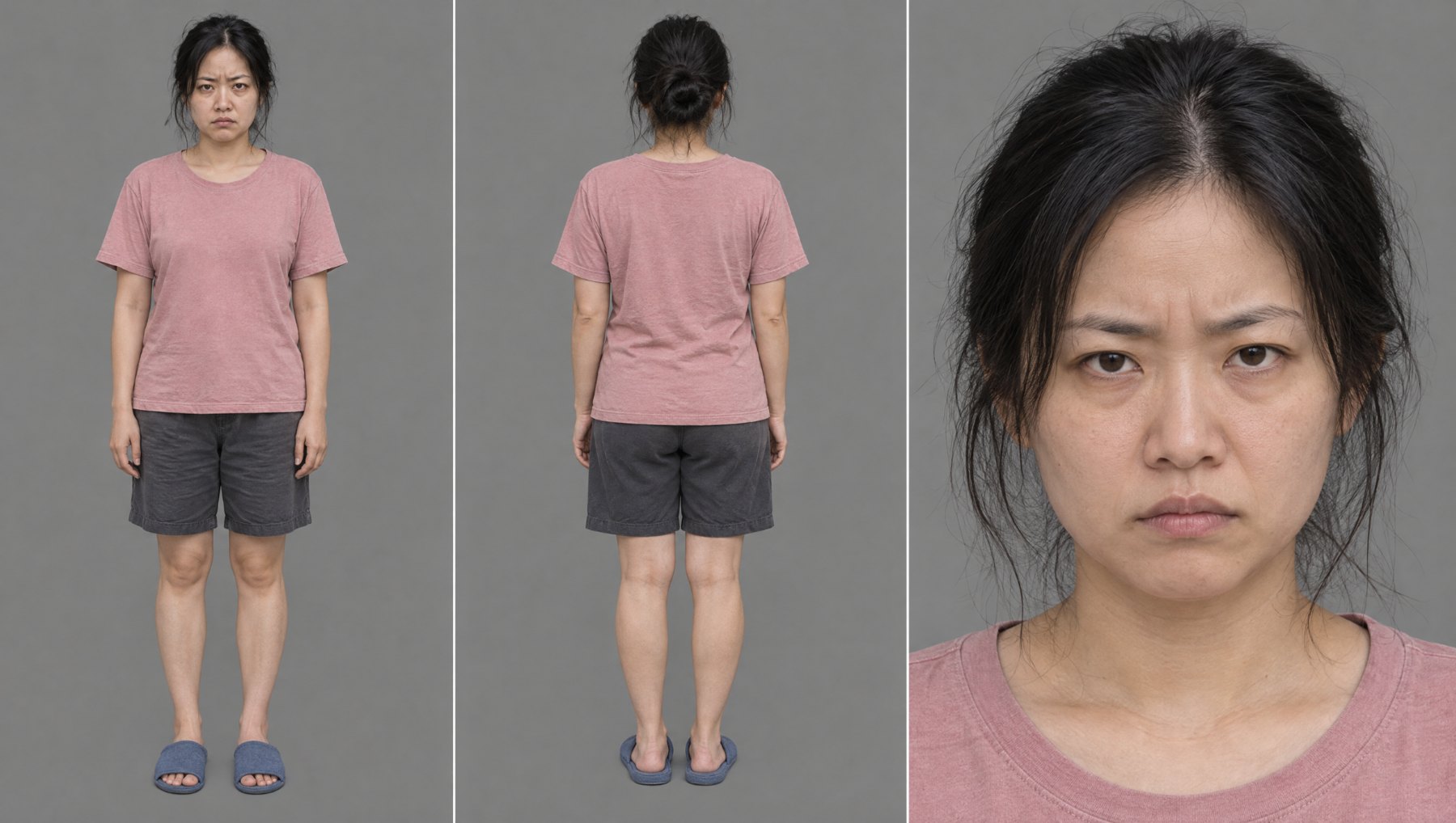
The character sheet
Grab my universal prompt, put one sentence about your character on top, and paste it into Claude (or any LLM). Then paste what you get back into Higgsfield. I tried a bunch of models and went with GPT 2.5 Flare.
What I typed in Claude
Edit the prompt below with this context I want to create a middle-aged 30s Chinese woman who's like, you can see her face is cranky. She's at home wearing a homewear outfit. She's cranky because life is not treating her well. The end result should be an edited prompt

A three-panel character reference sheet composed as one horizontal image, divided into three equal vertical panels side by side with thin clean separations. The same person in the same outfit, rendered identically in all three panels. No text, no labels, no numbering anywhere in the image.

The face comes from the attached reference and must match it exactly in every panel: same face shape, bone structure, eyes, brows, nose, lips, skin tone and hair.

CHARACTER: [build and height, body type, hair color, length and styling, makeup, piercings, tattoos, nails, overall vibe]

OUTFIT: [full outfit head to toe: top, bottom, shoes, jewelry, accessories, with colors, fabrics and fit]

LEFT PANEL — full body front view. The figure stands squared to the camera, framed from above the head down to the shoes, arms relaxed at the sides, weight even on both feet. The full outfit is clearly readable.

CENTER PANEL — full body back view. The complete figure from above the head down to the shoes, seen directly from behind, standing straight. Hair, back of the outfit and shoes are clearly readable.

RIGHT PANEL — tight chest-up face close-up. Framed from just above the head down to the collarbones, the face filling the panel, looking straight at camera, neutral relaxed expression, lips closed. Maximum facial detail.

Skin tone is identical in every panel, never darker or tanned on the back view.

The background is one flat 18% neutral gray field, identical in all three panels, with no gradient, no floor, no wall and no vignette. Flat shadowless frontal lighting, even on both sides of the face, no cast shadow under the feet and no shadow on the background. Realistic skin with fine soft pore texture and a matte finish, real hair strands, real fabric texture, never plastic, never CGI. Even sharpness everywhere, no blur. Photographed on a 50mm prime, soft natural film grain. Photographed not generated.
A three-panel character reference sheet composed as one horizontal image, divided into three equal vertical panels side by side with thin clean separations. The exact same woman in the exact same outfit in all three panels. No text, no labels, no numbering anywhere.

CHARACTER: A Chinese woman in her mid-30s, approximately 35 years old, a wife at home in everyday house clothes. Around 160 cm tall, average build with a soft waist and natural body proportions. Black shoulder-length hair loosely gathered into a messy low bun, with stray strands around her face. Natural warm beige skin, no makeup, short unpolished nails, no visible tattoos or piercings.

She has a distinctly cranky, fed-up expression, like everyday frustrations have worn down her patience. Slightly knitted brows, tired eyes with subtle under-eye shadows, closed lips pressed together and gently downturned at the corners. Her expression feels quietly irritated and unimpressed, rather than dramatically angry. Believable and human, never exaggerated or comedic. She must clearly look in her mid-30s: youthful skin with subtle natural texture, no deep wrinkles or gray hair.

OUTFIT: Comfortable, slightly worn homewear: a loose faded dusty-pink cotton T-shirt, dark charcoal cotton shorts ending just above the knees, and simple muted blue rubber house slippers. Soft, washed fabrics with natural creases. No jewelry, accessories, logos, or graphics.

LEFT PANEL — full-body front view. Standing squared to the camera, framed from above the head down to the slippers, arms relaxed at her sides, weight even on both feet. The entire outfit is clearly visible. She looks directly at the camera with her restrained, cranky expression.

CENTER PANEL — full-body back view. The complete figure from above the head down to the slippers, seen directly from behind, standing straight. The messy bun, back of the T-shirt, shorts, and slippers are clearly visible. Identical body proportions, hair, clothing, and skin tone.

RIGHT PANEL — tight face close-up. Framed from just above the head down to the collarbones, face filling the panel, looking straight at the camera. Slightly furrowed brows, weary eyes, and closed, subtly downturned lips convey impatience and accumulated frustration. Maximum facial detail. The exact same face as the front view.

Skin tone is identical in every panel, never darker or tanned in the back view.

The background is one flat 18% neutral gray field, identical in all three panels, with no gradient, no visible floor, no wall, and no vignette. Flat shadowless frontal lighting, even on both sides of the face. No cast shadow under the feet or on the background. Realistic skin with fine soft pore texture and a matte finish, individual hair strands, and authentic cotton texture. No plastic skin, no CGI appearance, no beauty filter. Even sharpness everywhere, no blur. Photographic 50mm prime lens aesthetic with subtle natural film grain.
Result
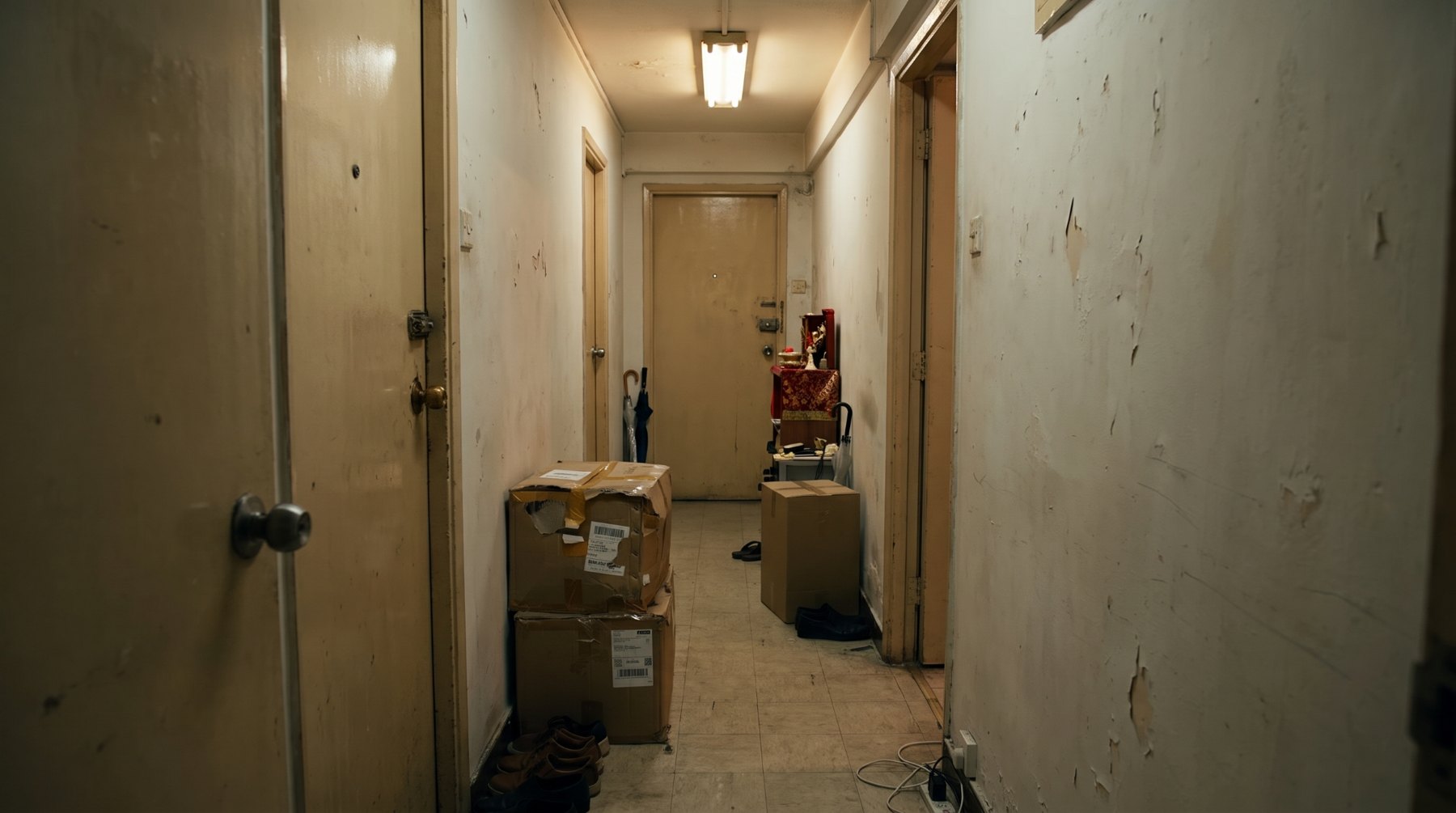
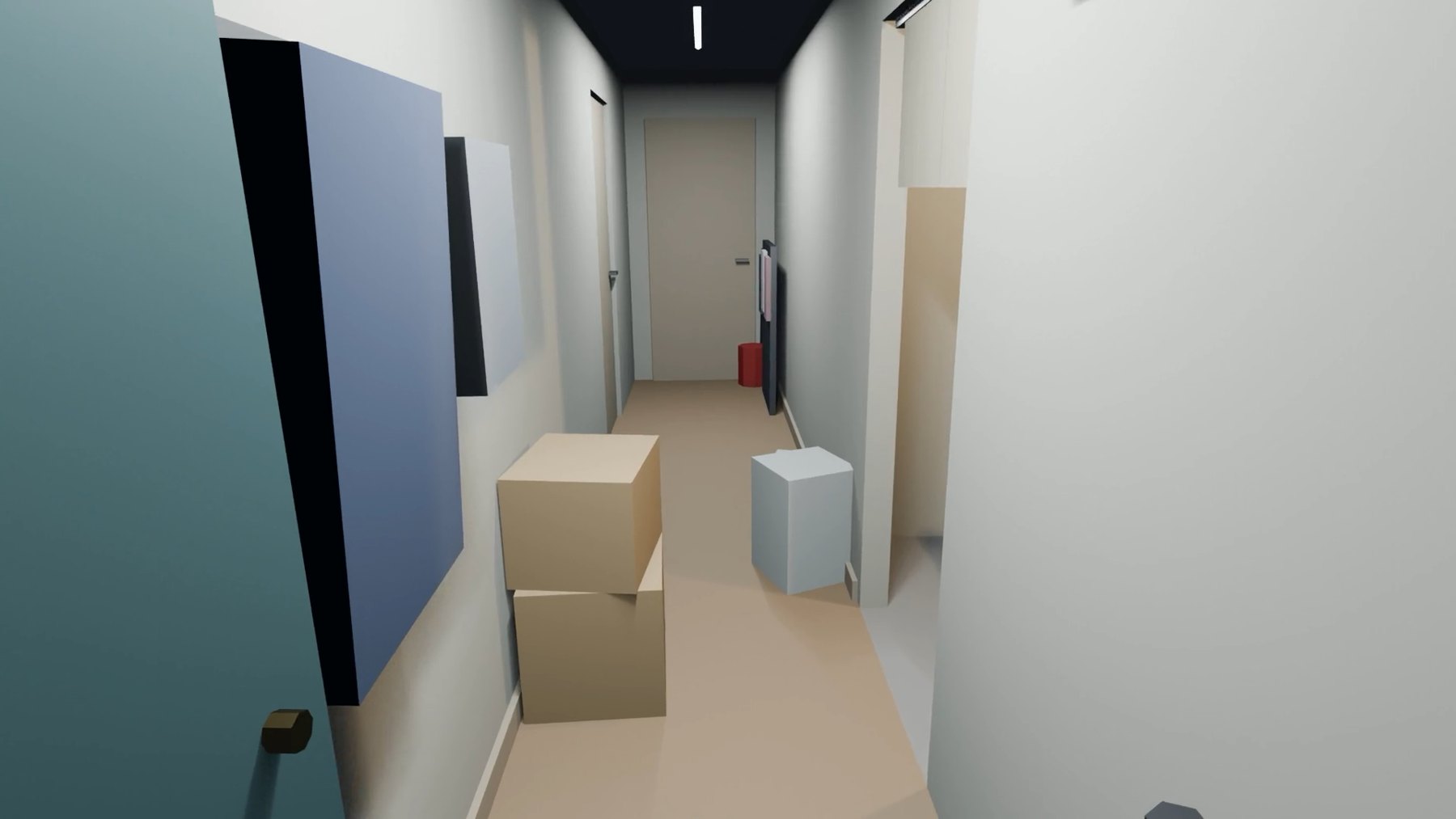
The hallway
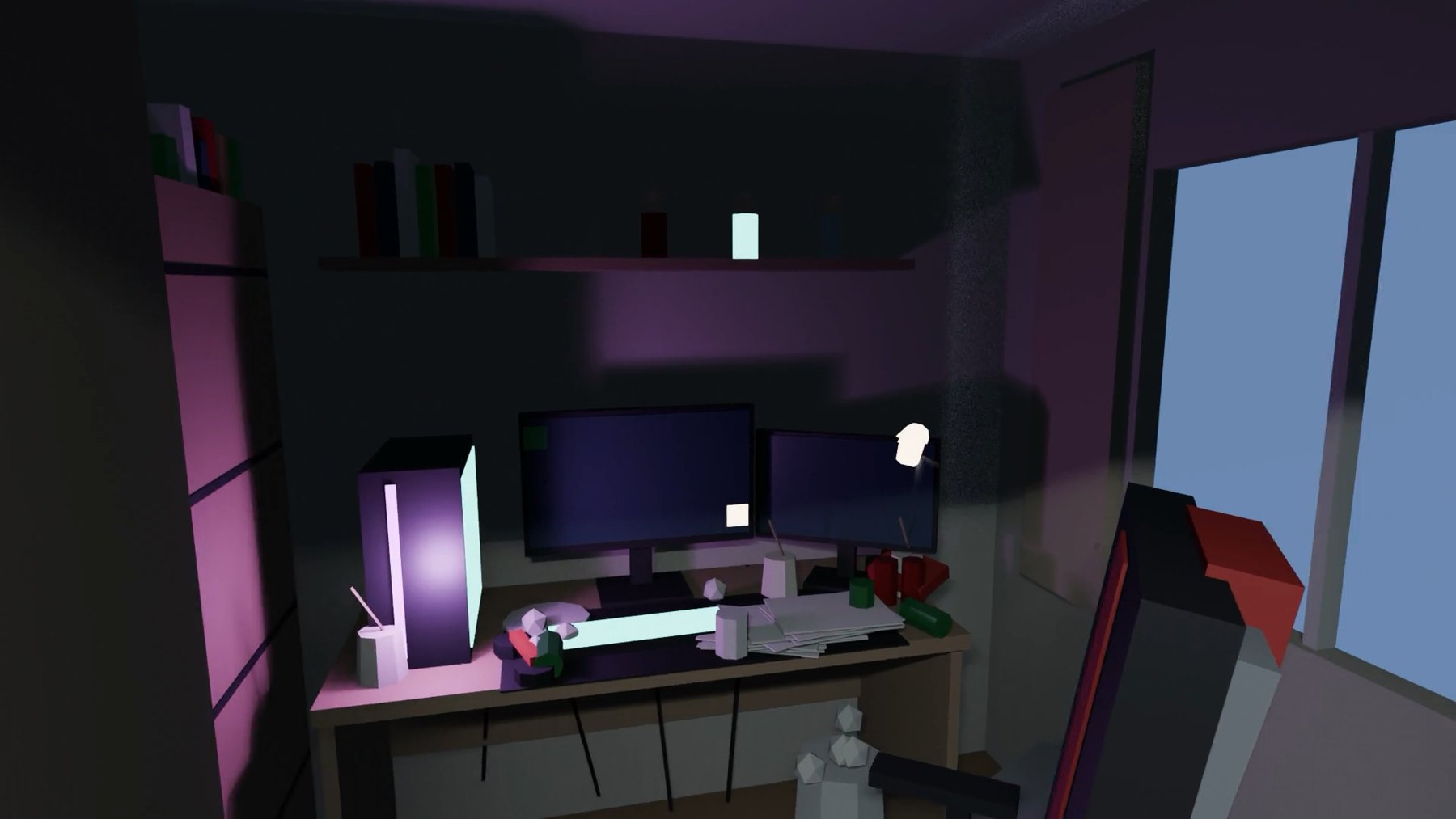
Screenshot from Blender
Take a screenshot of your Blender scene and turn it into a real shot. I tried a few models, Nano Banana Pro was the best. Set it to 2K.
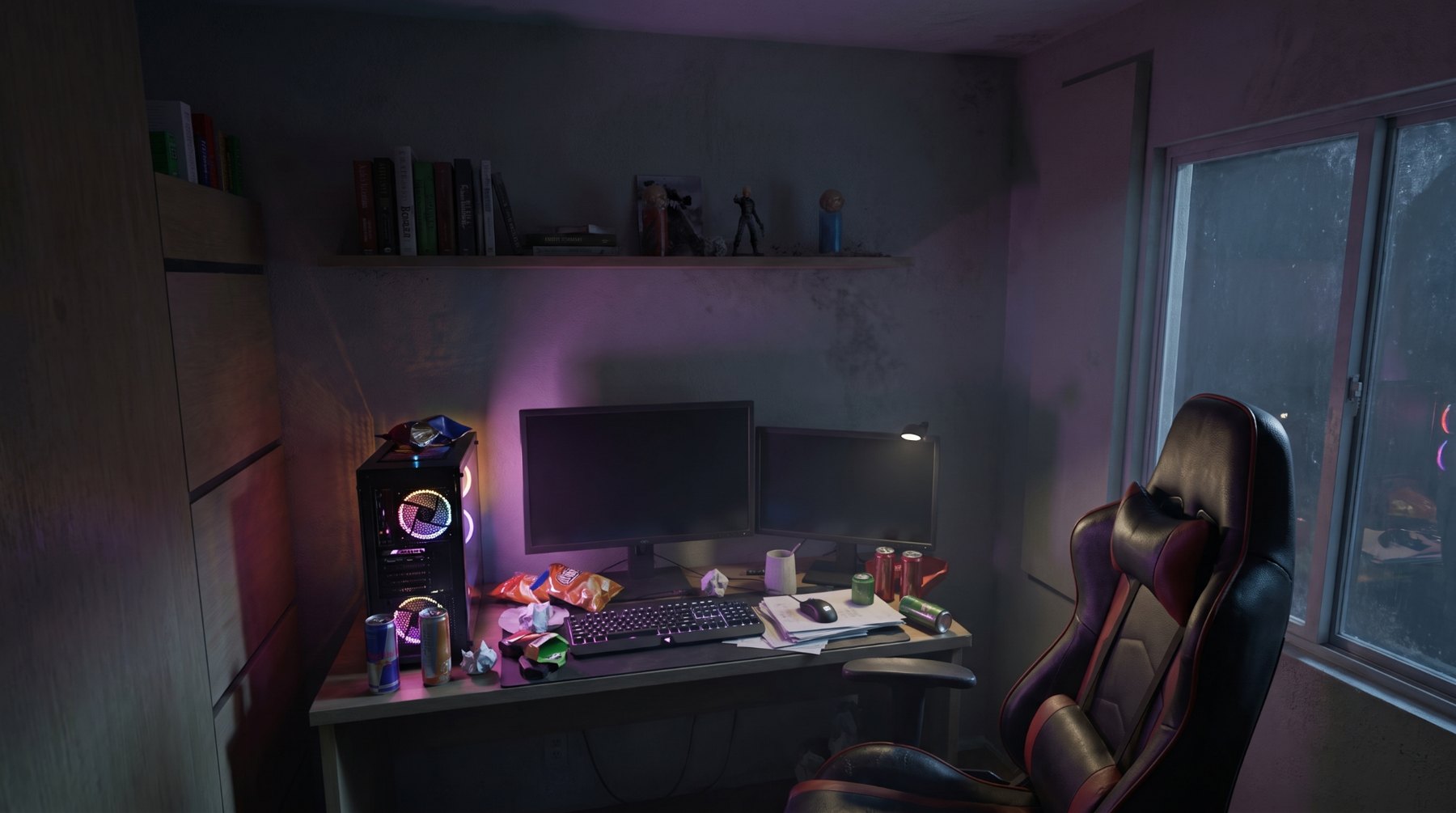
change this low poly scene of a very dimly lit cramped room with a messy gaming set up with the monitor turned off into a cinematic and realistic live action still, real gaming chair
Install it: Claude → Settings → Customize → Skills → Add → Upload skill, and pick the zip
Tag every reference and say what it is. That's super important, so the AI knows what it's looking at
The apartment scene
What I attached (plus the Blender MP4 as @video1)
What I typed in Claude
using /seedance-2-5-prompter i want you to write a 25 sec scene prompt.

the reference is @video1 for the video reference. the camera and physics movements must identically match this. ensure to study the frames in the entire video to understand the full scene context

@image1 is the character sheet of the woman

@image2 is the visual reference for the hallway and

@image3 is the visual reference for the pc room. the pc stays turn off through the video

This is my scene context: first person POV scene of us returning home to our asian cramped low budget apartment, unlocking the door and pushing it open.

We enter the cramped hallway and our wife who appears into frame with a crying baby, complaining in Chinese before disappearing out of frame again, still complaining. We continue walking forward and turn to enter our room, pushing open the door and turning the light switch on.

The room is a small office room with our very messy desk and our gaming setup. We slump into our chair and pull the chair forward, getting ready to play some games.
[GOAL]
A 25-second first-person POV scene, one continuous take: we get home late to a cramped, low-budget Asian apartment, unlock the front door and go in. In the hallway our wife steps in with a crying baby, complains at us in Mandarin and leaves again, still complaining. We keep walking, push open the door to our small office room, switch the light on, slump into the gaming chair and roll it up to the desk.

[REFERENCES]
@video1 is the motion and camera reference. Copy its camera path, timing, walking rhythm, head turns, hand actions, door swings, the wife's entrance and exit, and the chair slump and push-forward exactly. Take only motion, camera and layout from @video1. Do not use its grey blockout look, flat materials or simple figure shapes.
@image1 is the wife. Use her face, messy black bun with loose strands, faded pink t-shirt, dark grey shorts and blue slippers. Do not use the grey studio background.
@image2 is the look of the hallway: stained, peeling off-white walls, beige doors, a fluorescent tube light, worn beige floor tiles, cardboard boxes, shoes, umbrellas, a small red altar shelf and loose cables.
@image3 is the look of the office room: a small dim room with a cluttered desk, two monitors, a glass-sided PC tower, energy drink cans, chip bags, crumpled paper, a shelf of books and figurines, a black and red gaming chair and a window to the right.

[CONTINUITY]
Subjects: us (POV, only our hands and forearms are seen) and the wife from @image1, holding a baby wrapped in a white blanket in both arms. One wife, one baby. Her outfit never changes.
Scene: the front door opens into a narrow hallway. The boxes are on the left, the wife's doorway is on the right, and our room door is at the far end. Inside the room the desk is straight ahead, the gaming chair sits in front of it on the right, the window is on the right wall and the light switch is on the wall near the window.
Props: the same key in our right hand at the front door. The same gaming chair that we sit in and pull forward. The PC and both monitors stay switched off the whole time.

[STAGE 1 | 0–25s | first-person POV, one continuous handheld walk, no cuts]
Camera: eye-level first-person view at natural head height, gentle walking handheld motion matching @video1 exactly. No cuts.
0–3s: Night. We face our dark front door in a dim outer corridor. Our right hand comes up from the lower right with a key, unlocks the deadbolt with a twist, and at 3s pushes the door open. It swings inward to the left.
3–7s: We step inside and walk forward down the narrow hallway under the buzzing fluorescent tube, passing the stacked cardboard boxes on the left. The camera drifts slightly as in @video1.
7–10s: The wife steps out of the doorway on the right, holding the crying baby. She turns to face us and blocks the way. Her brow is pinched, her jaw is tight and her eyes are narrowed. She lifts her free hand and jabs it at us while she complains, bouncing the baby a little.
10–11s: She turns away mid-sentence and goes back through the right doorway, out of frame, still complaining off camera.
11–15s: We keep walking down the hallway to our room door at the far end. The camera turns slightly left as we reach it.
15–17s: Our hand pushes the door open. It swings inward and shows the dark room. The desk is straight ahead, lit only by cool, faint night light from the window on the right. The PC and monitors are off.
17–19s: We step in and the camera turns right towards the wall by the window. Our right hand reaches out and flips the light switch. At 19s the ceiling light comes on and the messy room is fully lit.
19–21s: The camera turns back left to the desk. We step up to the gaming chair and drop heavily into it. The camera sinks down to seated eye level with a tired slump.
21–25s: Seated, we pull the chair forward. The camera rolls closer to the desk until the dark monitors, keyboard, cans and snack wrappers fill the lower frame, settling in front of the screens, ready to play. End of video.

[VISUAL STYLE]
Photoreal, handheld first-person footage. The hallway has warm, greenish fluorescent light on grimy walls, matching @image2. The room is dim and cool before the switch, then plain warm overhead light, with the cluttered textures from @image3. Natural lens feel, light grain, a cramped, tired, lived-in mood.

[AUDIO]
<Keys jingle and the deadbolt clunks; the front door creaks open>
<Fluorescent light hum; footsteps on worn tiles>
<A baby cries loudly and won't stop>
Wife, angry and exhausted: {你又这么晚才回来?孩子哭了一整晚,你一点都不管!}
Wife, off camera as she leaves: {整天就知道打游戏……我真是受够了!}
<Our room door creaks; the light switch clicks; the ceiling light flickers on>
<The gaming chair creaks under our weight and its wheels roll over the floor>

[EXCLUSIONS]
The PC, its fans and both monitors stay off for the whole video: no RGB, no purple glow, no screen light.
No grey blockout figures or flat untextured surfaces from @video1.
No cuts, and no extra people besides the wife and the baby.

[MAINTAIN CONSISTENCY]
One wife, exactly as in @image1, always holding the same white-wrapped baby. She enters from the right doorway and leaves back through it.
The hallway layout and the room layout stay as described, with the desk ahead and the chair and window on the right.
The camera and physics follow @video1 exactly as one continuous POV take.
In Higgsfield: Seedance 2.5, 25 seconds (match your Blender video). Upload the same references and check every @image number matches before you hit generate, otherwise you waste credits. You can test in Seedance 2.5 Draft first and upscale to 1080p later.
Result
06
Advanced: the location
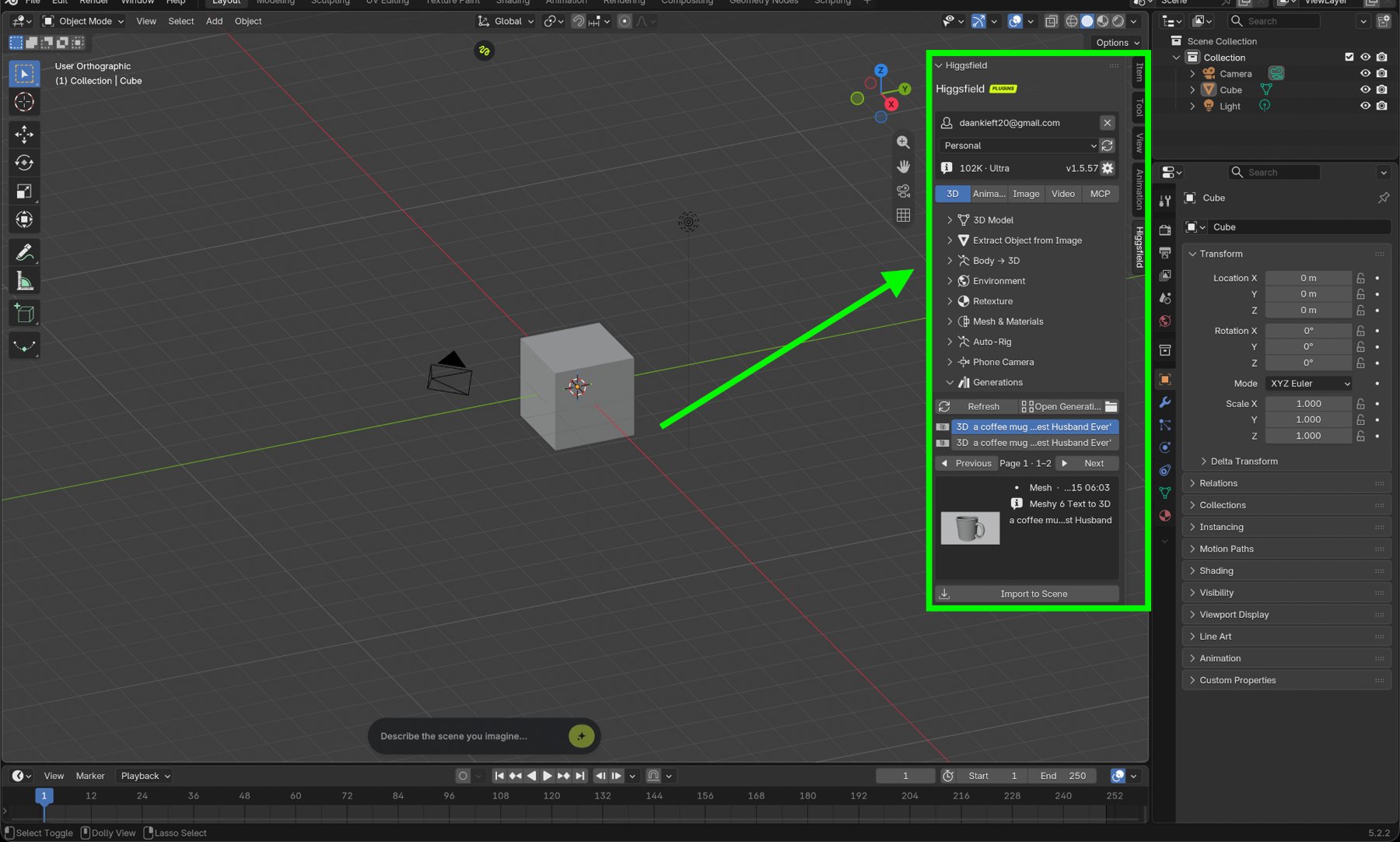
Now we use Claude to control Blender through the MCP, and Higgsfield for all the assets
We start with the location. Talk to Claude (I use Wispr Flow so I can just speak), get a prompt back, then test it on a few image models
For reference sheets I almost always go with Seedream 5.0
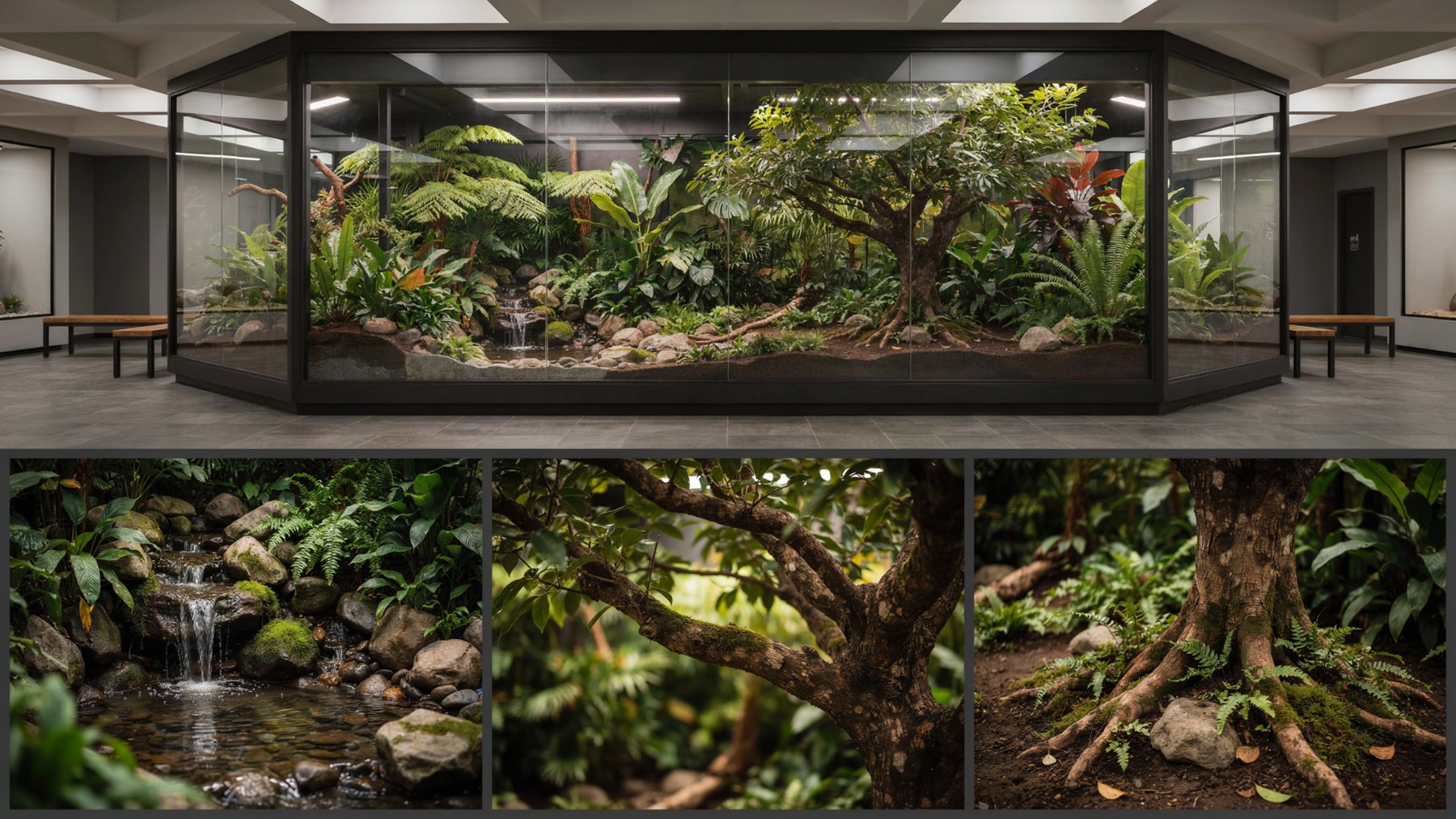
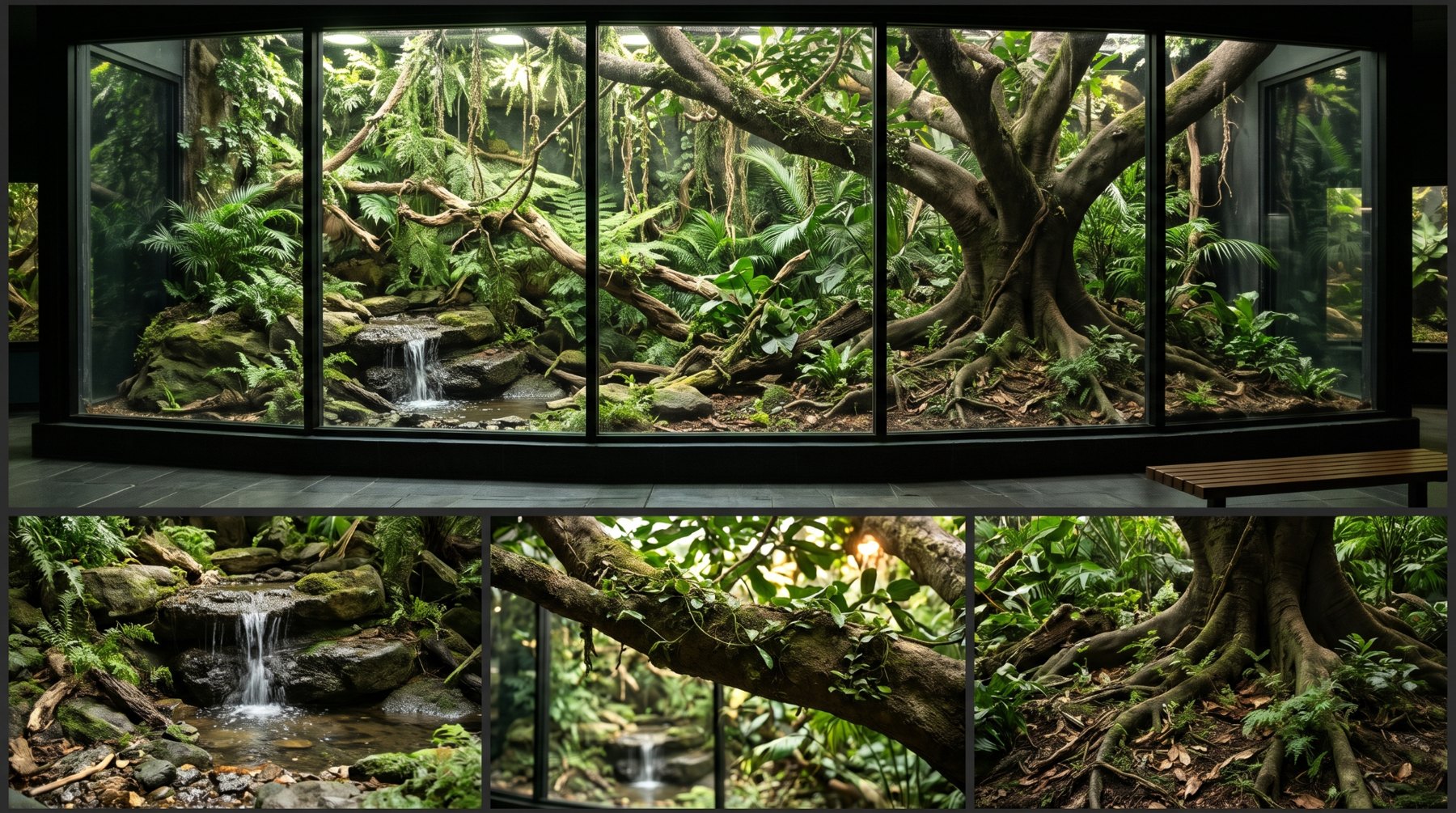
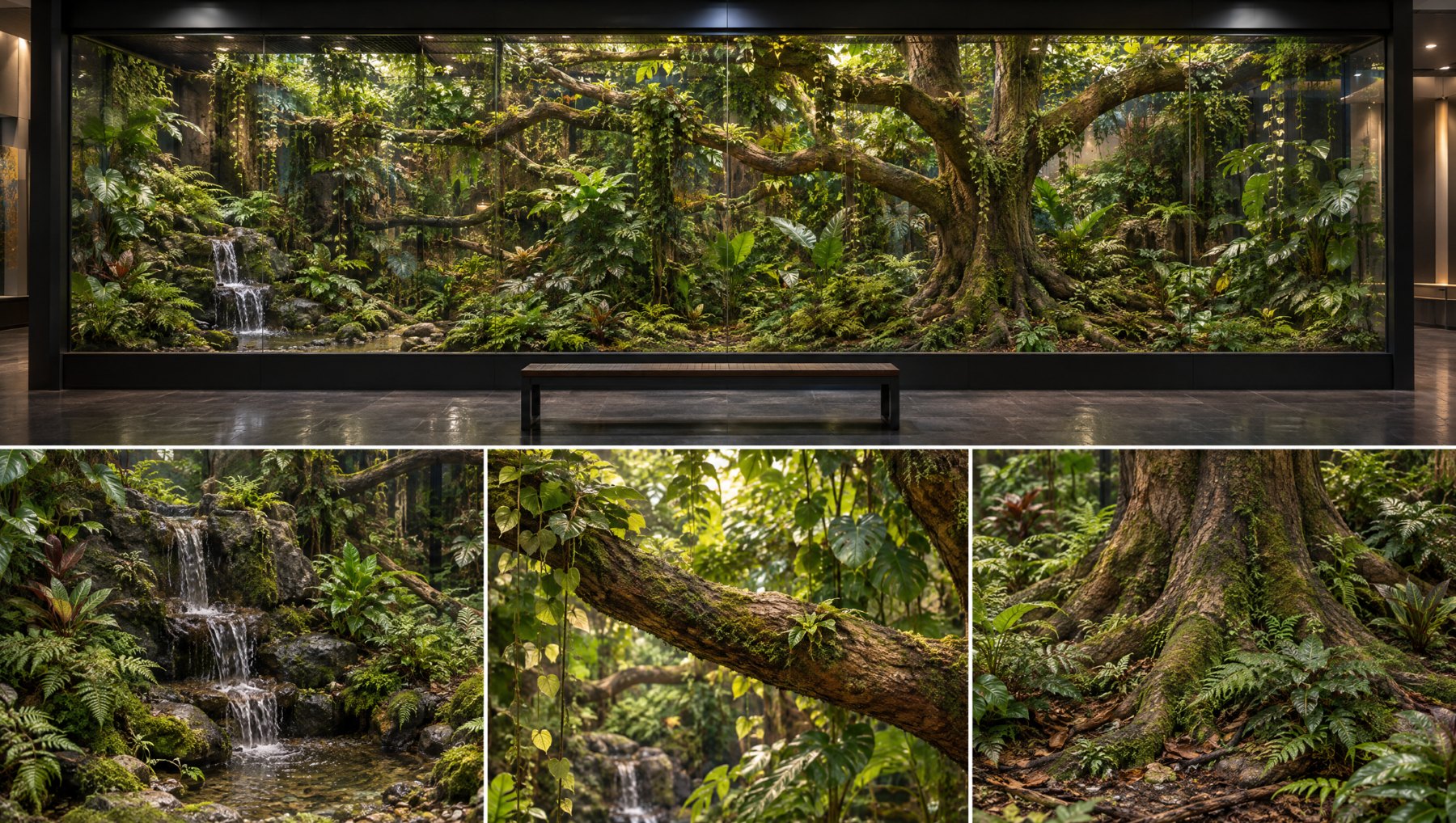
The terrarium
What I typed in Claude
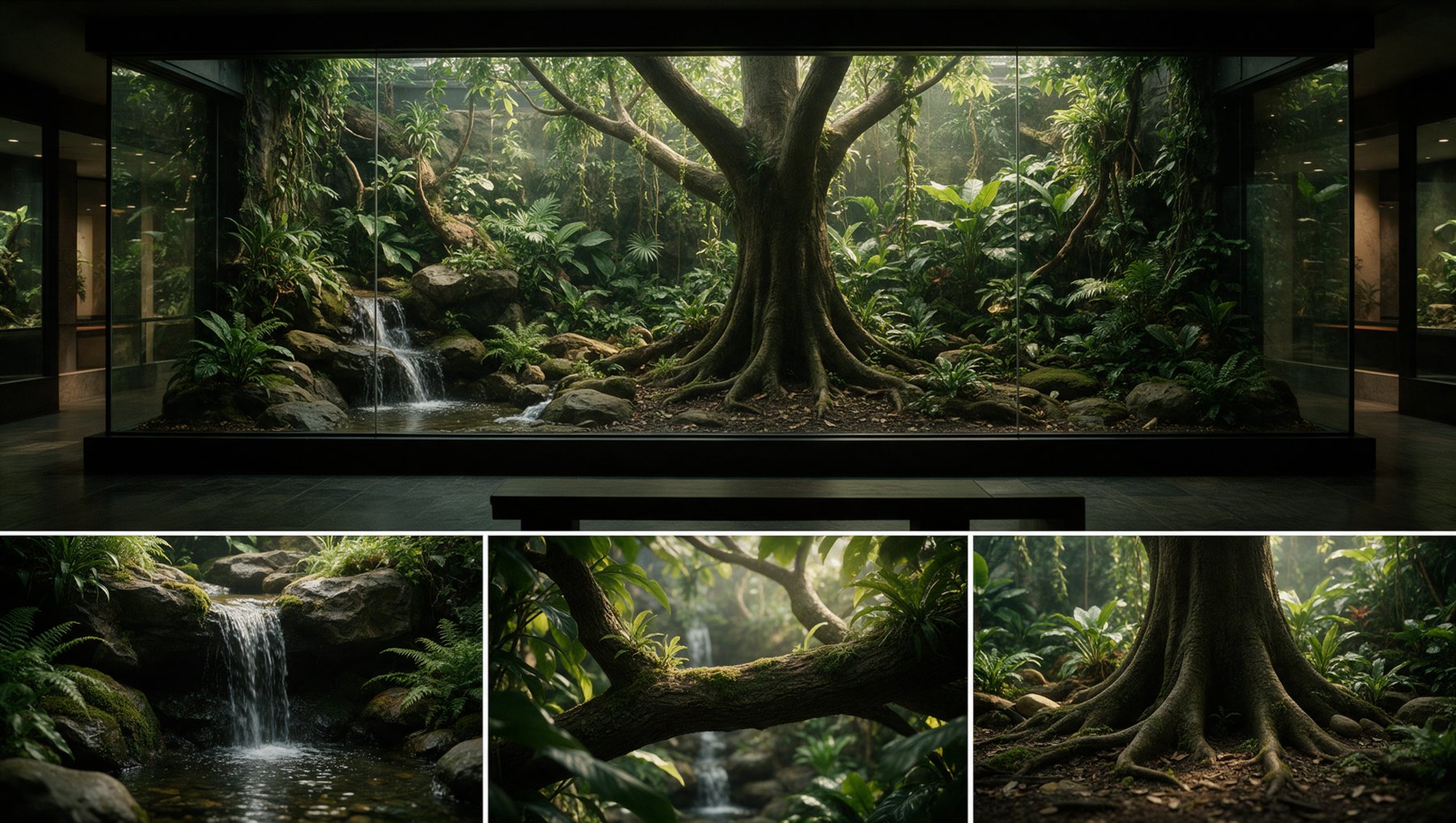
generate a text-to-image prompt. I want a cinematic terrarium location reference sheet with 4 panels. one large horizontal image at the top which will be our main reference, and then 3 smaller panels at the bottom.
The main reference is a dense tropical terrarium inside a premium indoor reptile house. i want a large tree stands at the centre and a waterfall on the left. For the other 3 panels, just have close ups
A cinematic location reference sheet laid out as four panels on a clean dark grey background with thin even gutters. One large wide horizontal panel fills the top half of the sheet, and three equal-sized smaller panels sit side by side in a row across the bottom half. No text, no labels, no characters, no animals, no people.

Top panel (main reference): A wide establishing shot of a dense tropical terrarium inside a premium indoor reptile house. The terrarium is a large glass enclosure with thin black frame edges just visible at the sides of the frame, set into a dark, upscale reptile house with polished stone and warm wood interiors softly out of focus beyond the glass. Inside, a large ancient tree stands at the centre, with a thick gnarled trunk, sprawling roots gripping mossy rocks, and branches covered in moss, ferns, bromeliads and hanging vines. On the left, a waterfall pours down a stacked wall of dark wet rock into a small clear pool at the base, with mist rising from where it lands. The ground is lush and layered: ferns, broadleaf tropical plants, moss carpets, pebbles, fallen leaves and twisting roots, with a winding open path running from the foreground toward the pool. Warm overhead terrarium lighting falls from above in soft shafts through light mist, with deep green shadows below. Rich greens, dark wet stone, warm highlights. Shot at a low eye level close to the terrarium floor so the plants feel huge. Photoreal, cinematic, shallow haze, high detail.

Bottom left panel: A close-up of the waterfall base, water crashing onto dark wet rocks and spreading into the clear pool, spray and droplets in the air, moss and small ferns clinging to the rock edges.

Bottom middle panel: A close-up of the central tree’s base, huge twisting roots and bark textures covered in thick moss, a bromeliad tucked in a fork of the trunk, soft light catching the damp surfaces.

Bottom right panel: A close-up of the terrarium floor at ground level, dense ferns and broad leaves towering overhead, moss, pebbles and fallen leaves in the foreground, the glass wall of the enclosure faintly visible in the soft background.

All four panels share the same terrarium, the same plants, the same warm overhead lighting and the same colour palette, so they read as one consistent location. Cinematic photoreal style, 16:9 sheet.
Same prompt, four models
07
Advanced: connect Claude to Blender
In Claude go to Settings → Customize → Connectors, search for Blender and install it
Click View details, then Instructions. That takes you to the setup page
Download the add-on zip. Don't unzip it, drag it into Blender and install it. Read the page, it tells you to do this twice
In Blender: Edit → Preferences → Add-ons, check the MCP is there
Go to System → Network and turn on Allow Online Access
Back in Add-ons, click the MCP and start the bridge server
Test it: ask Claude "am I connected to Blender?"
08
Advanced: build the location in Blender
Drop your location image into the Claude chat and tell it what to build
Keep it simple. Most of the detail gets added later in the AI video tool, so you don't need every bush and tree in Blender
Image to 3D
What I attached
What I typed in Claude
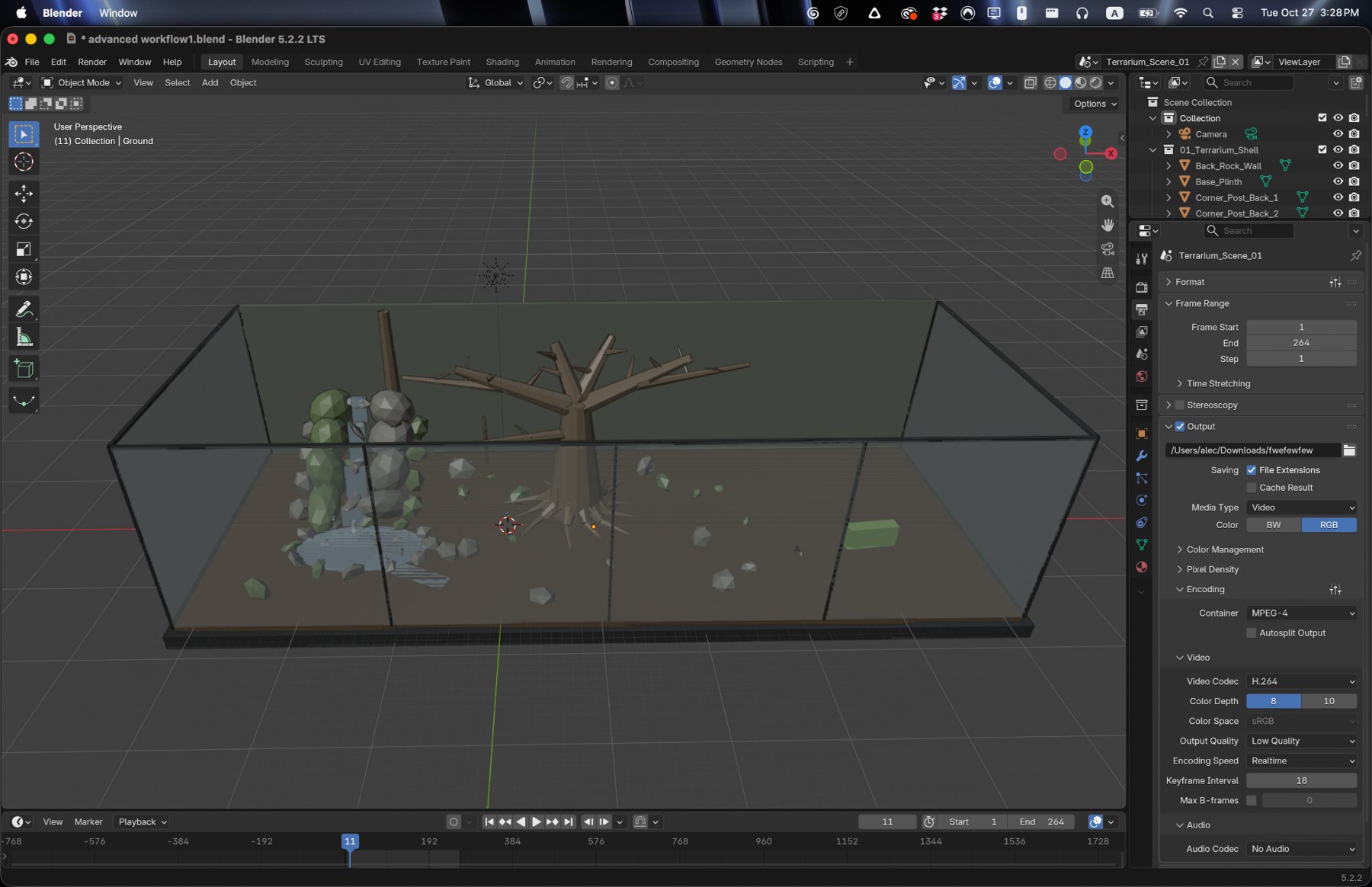
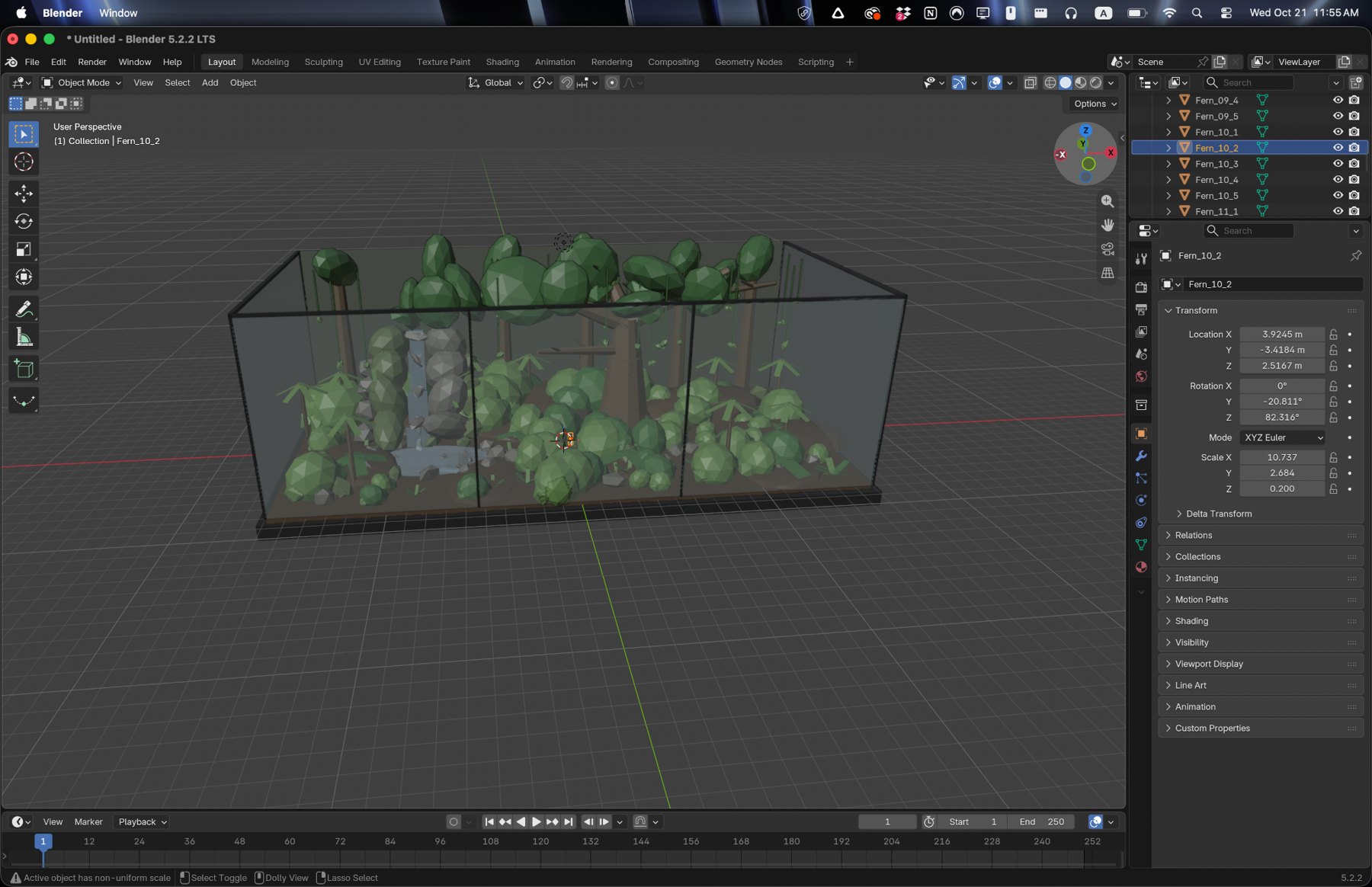
Okay, so I want you to build the entire interior of this enormous terrarium, which has a massive ecosystem inside. I attached a reference to it. It should be large enough that the camera can move freely around the entire environment without feeling restricted. Keep the scene low-poly and simple so it doesn't require too much modelling work or computing power. The main goal is to establish the overall layout and scale of the environment without spending too much time on details or using too much computing power.
Result
The fixes
Way too small for a chase scene, and too much stuff in it. So I just told Claude.
What I typed next
lets remove the top of the terrarium and make the treearium 4x in size, lets make the waterfall and the busines, tress etc a bit more detailed maybe 50% more
Result
09
Advanced: the chase scene
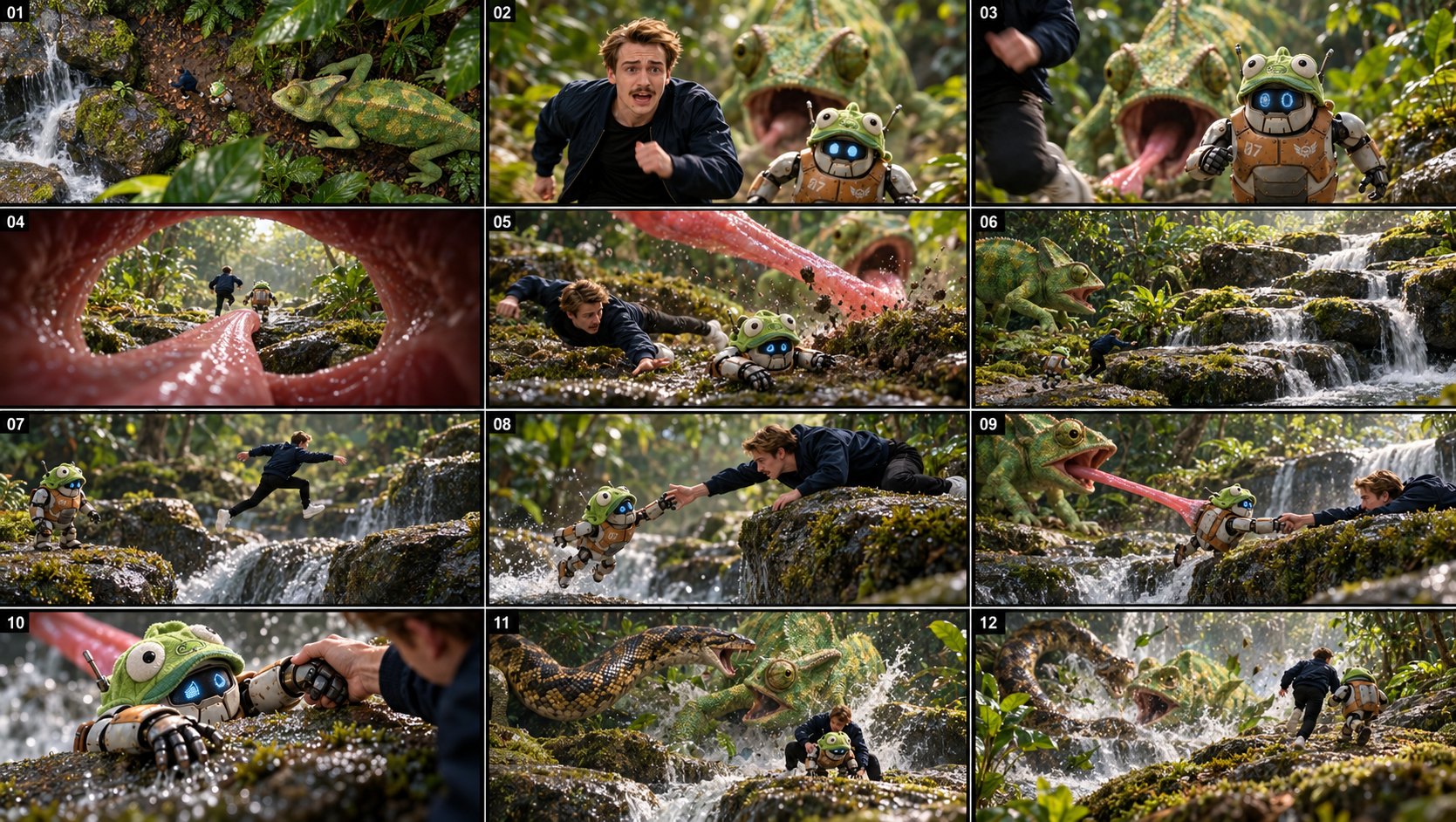
Don't let Claude do the creative thinking. Know what happens in your scene before you start. I knew I wanted an overhead shot, a pan to me and Bruiser panicking, and the chameleon attacking
Can't picture it? Make a storyboard. Mine is below
You don't need every detail in Blender. Me ducking under the tree and the chameleon smashing it aren't in the Blender scene, Seedance added them. As long as it doesn't mess up the camera move, it's fine
Always generate in Seedance 2.5 Draft first to save credits, then upscale
The chase
My storyboard
What I attached (plus the Blender MP4 as @video1, and voice clips of me and Bruiser as @audio1 and @audio2)
What I typed in Claude
Here are the references I gave you for context to my scene.

@video1 is the video reference, we have to follow the camera movement of the scene
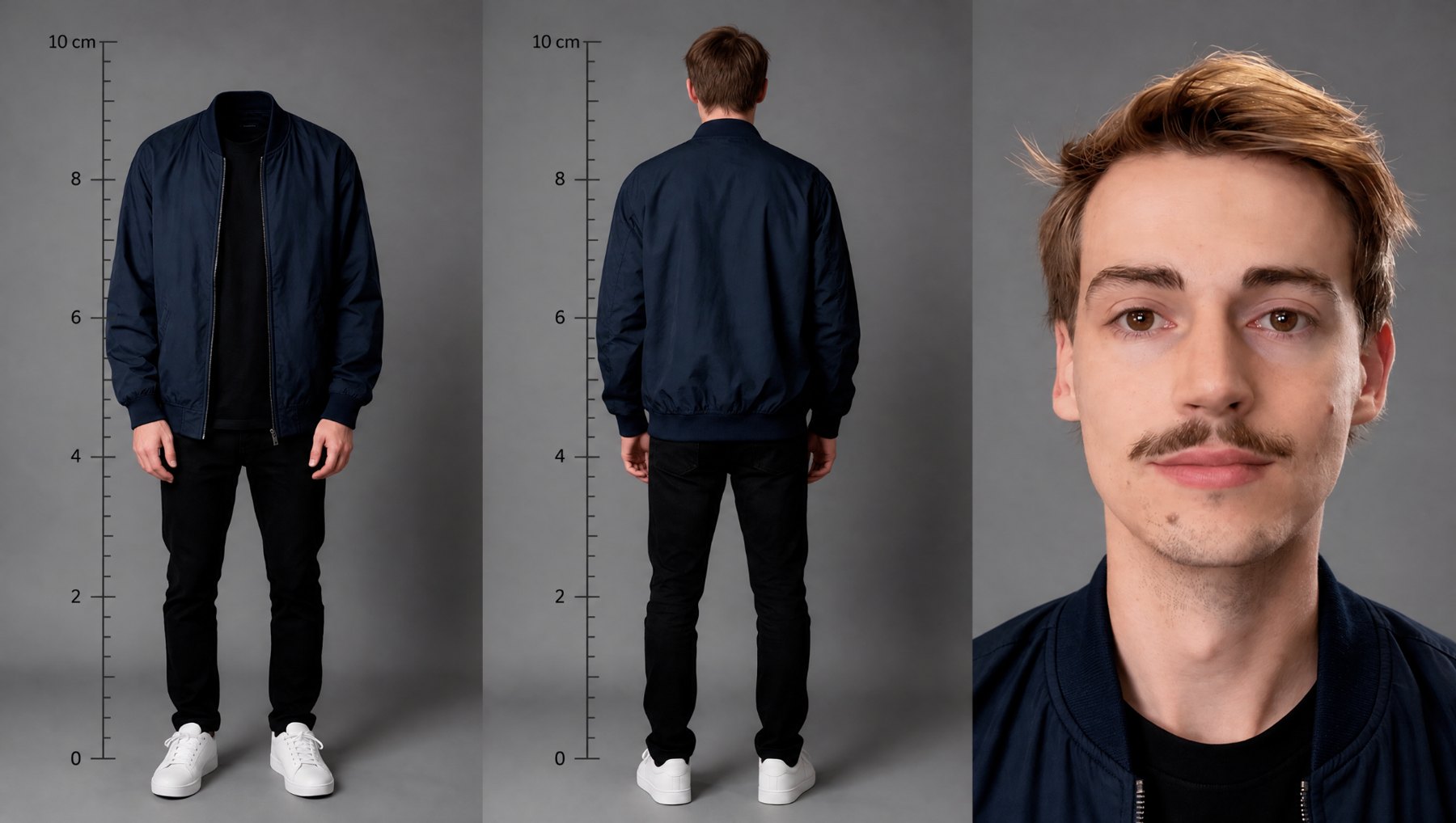
@image1 is Dan the human
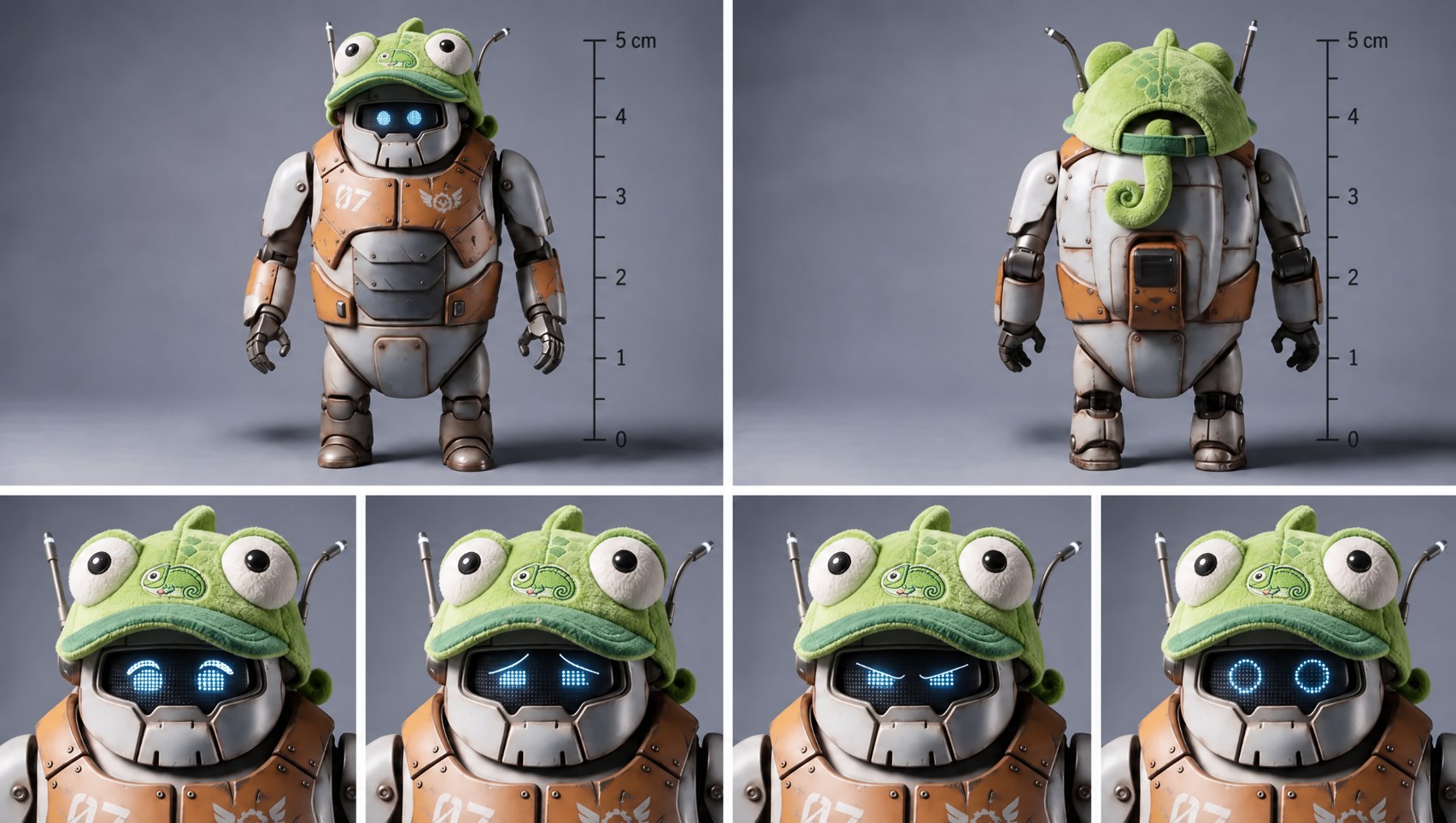
@image2 is Bruiser the robot
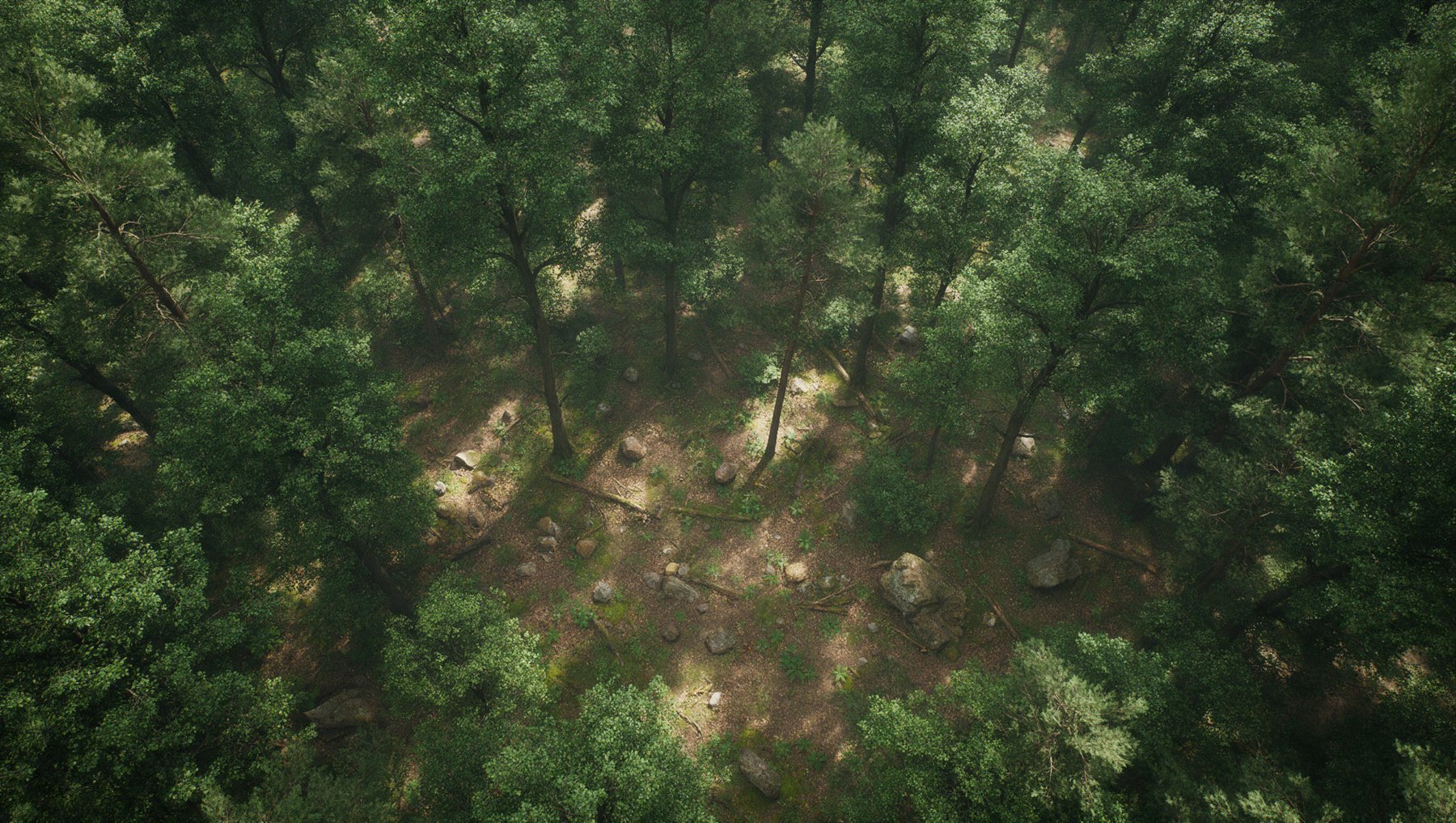
@image3 we have the forest location reference
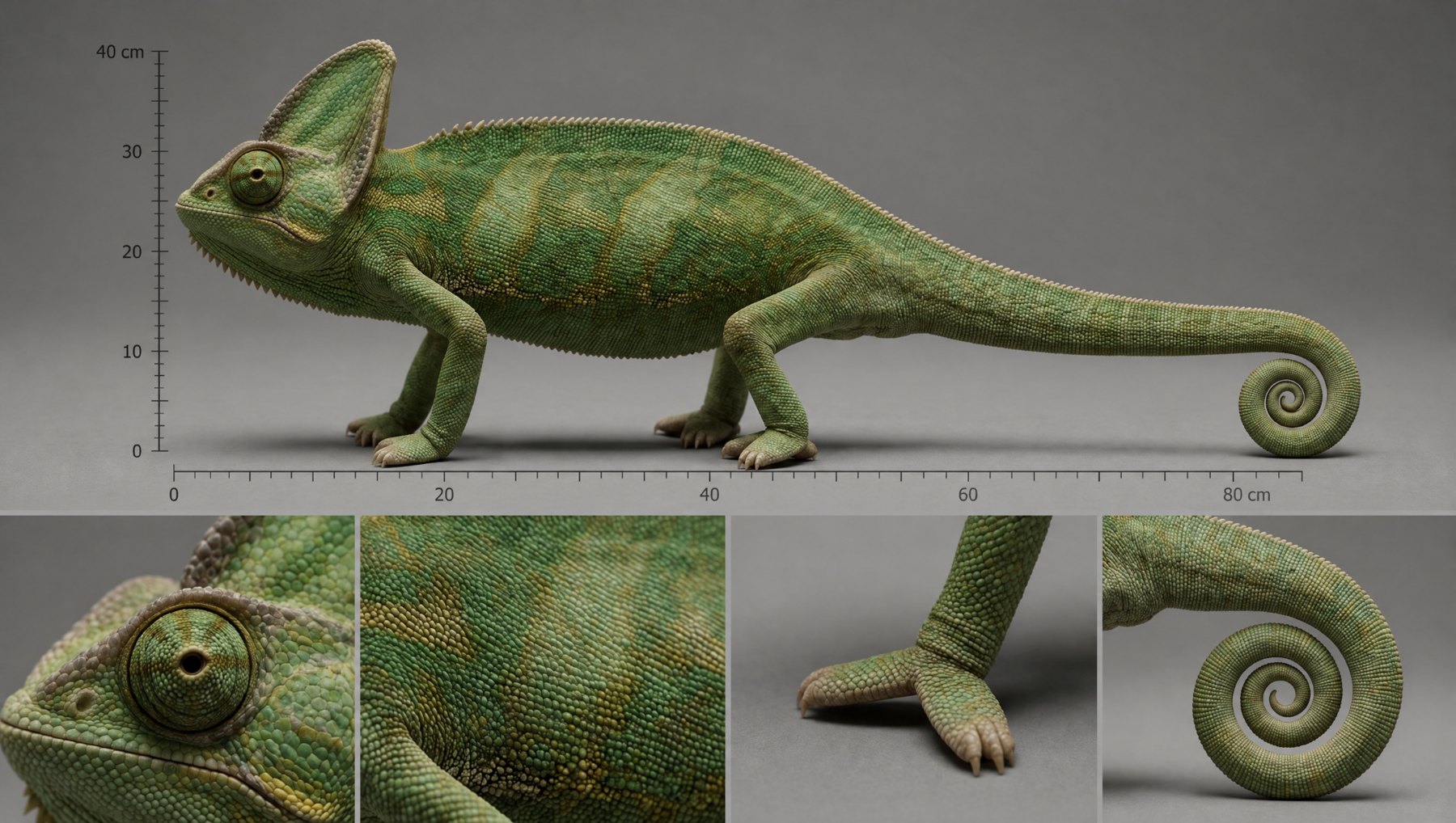
@image4 is the huge chameleon

@audio1 is the audio reference for Dan
@audio2 is the voice reference for Bruiser

Using /seedance 2-5 prompter, generate a 10 second prompt and it's a one continuous shot. Here’s the context for the scene.

So what I want to happen is start off with a top down overhead shot with the chameleon chasing Dan and bruiser. It’s a tense chase scene.

After a few seconds, the camera glides down to a close up of Dan and he ducks a large tree branch. Dan tells Bruiser “Bruiser! Get us out of here!” and the Charmeleon breaks the tree stump. The camera quickly pans to bruiser who replies “I can’t! I set a timer, we have to survive five minutes!”

Then the camera shows the chameleon who shoots out his tongue at bruiser who ducks under it and screams in fear
[GOAL]

A cinematic, photorealistic 11-second jungle chase in one continuous shot. Shaky handheld action-thriller horror energy. Dan and Bruiser flee a feral, enormous chameleon that smashes through a fallen trunk, growls and launches its tongue at Bruiser.

[REFERENCES]

@video1 — Camera angles, framing and continuous camera path only: overhead opening, descend toward Dan, pan to Bruiser, then tilt toward the pursuing creature. Add strong handheld energy to this camera path.

The green block in @video1 marks the pursuing chameleon’s position only. Replace it with the fully realised chameleon from @image4. Create its movement independently; do not copy the block’s rigid motion or orientation.

@image1 — Dan’s identity and outfit.

@image2 — Bruiser’s identity, body, legs and green chameleon hat.

@image3 — Terrarium jungle, vegetation, roots, soil and lighting.

@image4 — Chameleon appearance, anatomy, scales and markings.

@audio1 — Dan’s voice. Match its characteristic pitch, timbre, resonance, texture, accent and pronunciation.

@audio2 — Bruiser’s voice. Match its characteristic pitch, timbre, resonance, texture, accent and pronunciation, including his startled shout.

Preserve both voice identities during breathless dialogue and shouting. Keep Bruiser’s voice faithful to the recording without extra robotic processing.

[SCENE AND FEEL]

Deep inside the terrarium jungle. Dan is 10 cm tall, Bruiser is 5 cm tall, and the chameleon is approximately 100 cm long, including its tail.

Dan and Bruiser sprint side by side along a straight route. One large, rotten fallen trunk crosses their path, leaving a low opening underneath.
The chameleon pursues closely with feral energy: fast, aggressive, hungry and relentless. It feels like a living animal with believable weight and natural movement. Wet saliva glistens around its mouth, with thin strands stretching between its jaws when they open.

[STAGE 1 | 0–11 SECONDS | ONE CONTINUOUS HANDHELD CHASE]

Begin directly overhead, looking vertically down at Dan and Bruiser already sprinting, with the chameleon pursuing behind them.

Follow the camera path of @video1, with urgent handheld shake, sudden jolts and imperfect framing corrections. Descend and sweep ahead of Dan into a frontal medium close-up, tracking backward as though the camera operator is fleeing with them. Keep the action readable.

Dan shouts in English, matching @audio1:

{Bruiser! Get us out of here!}

While speaking, Dan reaches the fallen trunk. He ducks sharply underneath it mid-sentence, keeps running and straightens again. The camera dips with him as the wood passes closely overhead. Bruiser ducks beneath the same trunk beside him.

During the end of Dan’s line, pan quickly sideways and lower toward Bruiser.

Bruiser replies urgently in English, matching @audio2:

{I can’t! I set a timer—we have to survive five minutes!}

Behind them, the chameleon SMASHES aggressively through the SAME rotten trunk. Wood bursts apart, throwing bark, splinters and leaves outward.

AFTER breaking through the trunk, it releases a threatening growl and surges through the falling debris, still closing the distance.

As Bruiser finishes, swing and tilt toward the chameleon, keeping Bruiser low in the foreground. The camera jolts with the frantic action.

The predator opens its wet jaws. Saliva stretches briefly between them before its tongue shoots toward Bruiser.

Bruiser ducks instinctively. The tongue narrowly misses his green hat and lashes past toward the foreground beside the lens, scattering small saliva droplets.

Bruiser lets out a short, spontaneous shout of surprise, matching @audio2.

The tongue snaps back toward the chameleon as Bruiser recovers from the duck and keeps running. End with the pursuit still underway.

[SOUND]

DIEGETIC SOUND ONLY. No music, score, musical stings or added cinematic risers.

Use breathless dialogue, running footsteps, disturbed leaves, the trunk cracking, falling debris, the chameleon’s growl AFTER the trunk breaks, the wet tongue strike and Bruiser’s startled shout. Keep the dialogue clear.

[STYLE AND CONTINUITY]

Photorealistic action-thriller horror. Shaky, urgent handheld camerawork throughout, with readable faces and clear action. One continuous shot.
In Higgsfield: Seedance 2.5, 10 seconds to match the Blender video. Same skill as before.